
Why Offline Inspections Improve Compliance
Many industries are governed by strict compliance requirements.
Regulatory bodies do not accept excuses such as poor connectivity or system downtime. They only look at one thing — whether inspections were completed on time and documented properly.
Using offline inspection software ensures that inspections continue even in areas with limited or no network access. Regulatory compliance depends on execution, not connectivity.
An effective offline safety inspection system ensures:
Mandatory inspections are never skipped
Audit trails remain complete
Evidence such as photos and remarks are captured at the right time
Compliance gaps are reduced
With digital inspections offline, organizations can conduct inspections and record data even during network outages. This ensures that compliance inspections remain consistent and verifiable.
When inspections are recorded digitally, even through inspection software with offline mode, organizations remain prepared for internal audits and regulatory checks.
Why Missing Inspection Coverage Is a Big Risk
In distributed operations, connectivity challenges are not rare exceptions.
An estimated 15–30% of field locations experience unreliable network access at any given time, particularly in remote, indoor, underground, or mobile environments.
As a result, inspection coverage often becomes inconsistent across sites.
Studies in safety and compliance programs also indicate that missed inspections are disproportionately correlated with connectivity issues — not inspector intent or negligence.
When inspection systems cannot function reliably offline, execution gaps begin to appear.
Inspection coverage gaps often appear minor on the surface. However, these blind spots remain hidden until an incident, audit failure, or compliance review exposes them.
What Happens When Offline Is Not Properly Supported
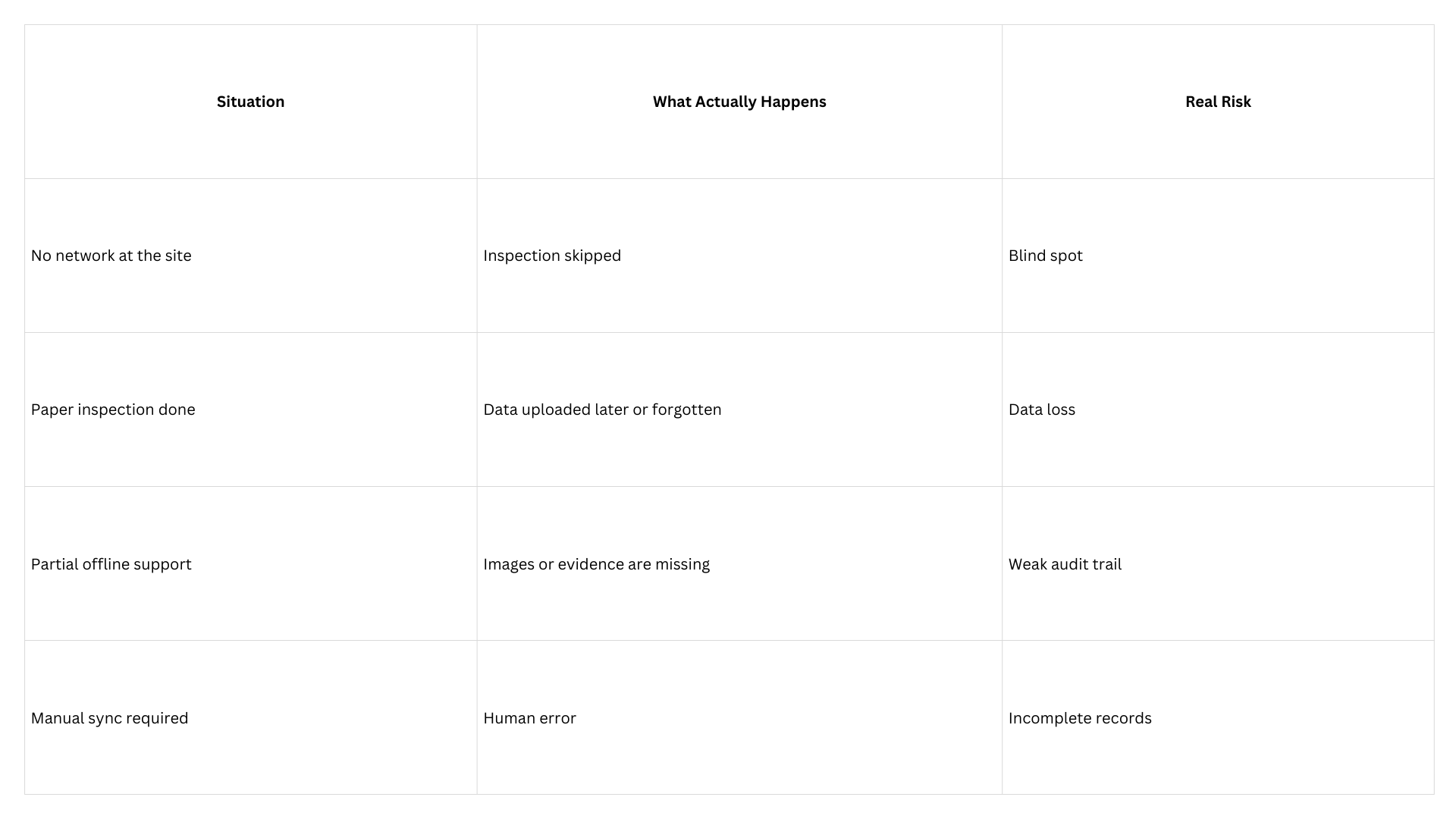
When offline functionality fails, the issue is not inconvenient — it is a direct operational and compliance risk.
Offline Inspections Reduce Manual Work
Without reliable offline capability, teams often fall back on paper-based inspections when connectivity is unavailable.
This creates multiple operational problems:
Duplicate work (paper first, system later)
Data entry errors
Missing inspection records
Delayed reporting
Organizations that rely heavily on manual backfilling of inspection data consistently experience higher error rates and delayed incident detection, increasing both compliance exposure and safety risk.
Offline digital inspections remove the dependency on paper by enabling inspectors to complete checklists directly at the site — even without internet access.
Data is captured once, at the source, improving accuracy and saving operational time.
Better Data Accuracy and Evidence Collection
Offline inspections follow a structured workflow that ensures data is captured at the right time and synchronized automatically when connectivity returns.
Offline Inspection Workflow
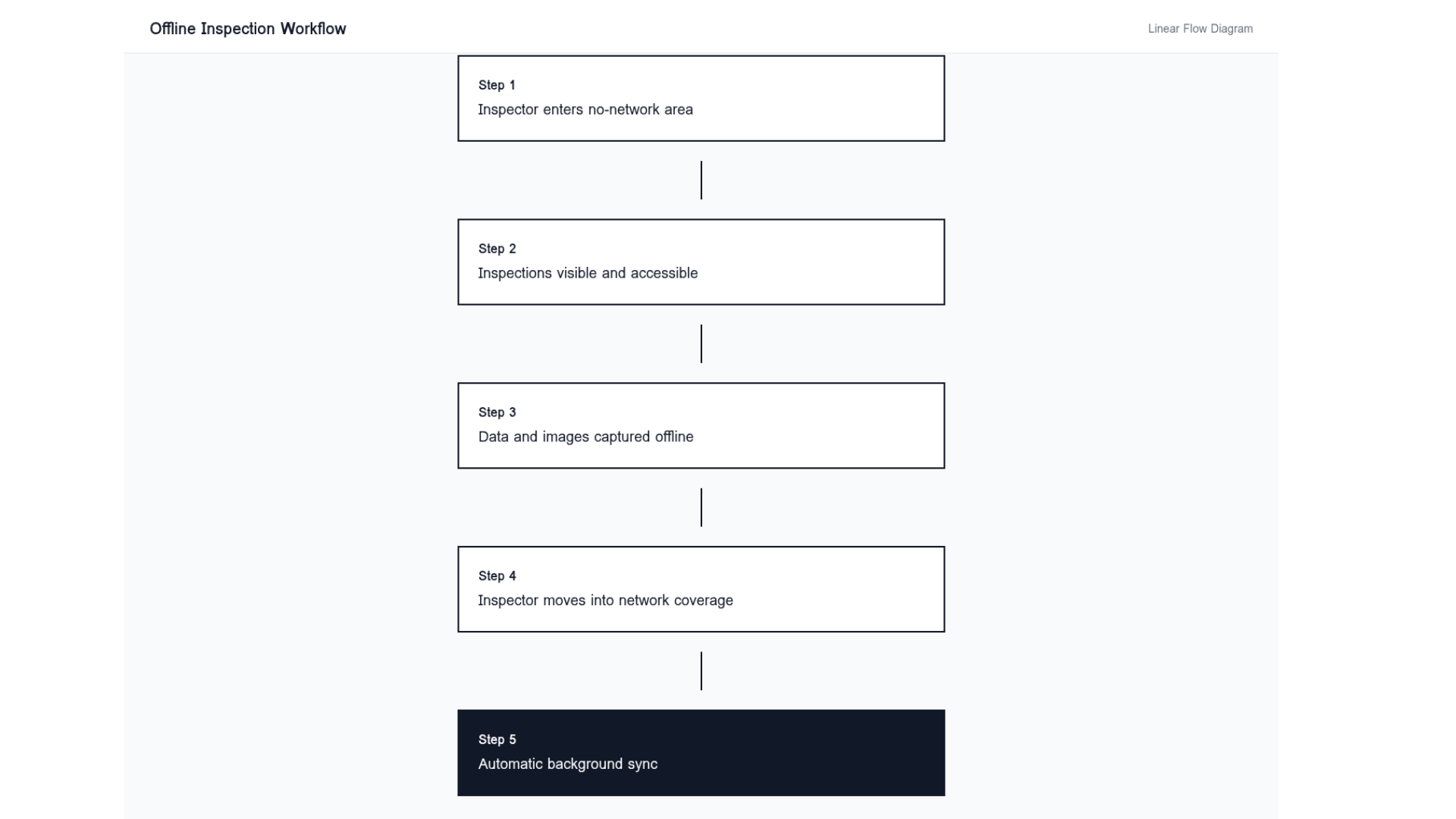
Offline inspection workflow: inspections are completed without internet and automatically synced once network coverage is restored.
When inspections are performed offline using digital tools:
Photos are captured at the inspection location
Time and date are recorded automatically
Inspector identity is logged
Inspection responses are stored securely on the device
Once the inspector moves back into network coverage, data is synced automatically in the background.
In field-heavy environments, seamless offline-to-online syncing improves inspection completion consistency by 20–35%, significantly strengthening audit readiness.
“We Support Offline” Is Not Enough
Many inspection tools claim offline capability.
In practice, this often means limited access rather than full inspection execution. Critical steps such as image capture, evidence storage, or syncing may remain unstable under real site conditions.
This difference usually becomes visible only after rollout.
True offline capability supports the complete inspection workflow — not just partial access.
How Offline Inspections Support Business Continuity
Operations should not slow down or stop because network connectivity is unavailable.
Offline inspections allow field teams to continue their work without disruption, ensuring inspection schedules remain intact across all locations.
Whether at remote sites, underground facilities, warehouse basements, or outdoor environments, inspections can proceed without compromising safety coverage or productivity.
Industries Where Offline Inspections Are Critical
Offline inspections are essential in environments where connectivity cannot be guaranteed.
Common use cases for offline inspection software include:
Manufacturing
Oil and gas
Forest management
Warehousing and logistics
Construction
Retail and fuel stations
Mining and infrastructure
In these industries, the ability to perform safety inspections offline and manage field inspections offline directly impacts safety, asset protection, and regulatory compliance.
Choosing the Right Offline Inspection System
When evaluating inspection software, organizations should ensure that offline capability is comprehensive and reliable.
Key aspects to assess include:
Full checklist access without internet
Offline photo and evidence capture
Automatic background syncing
No data loss during network transitions
Secure offline data storage
Testing offline performance under real site conditions is essential before large-scale deployment.
Conclusion
Offline inspections ensure that safety, quality, and compliance processes do not depend on internet availability.
By using digital inspections offline, organizations maintain inspection continuity, reduce operational risk, and strengthen compliance readiness.
In environments where inspections matter, inspection without internet is not an optional feature — it is a foundational requirement.


