
Retail stores don’t lose customers because of one big mistake.
They lose customers because of small things that go unnoticed every day.
A logo light that is switched off.
A mannequin with chipped paint.
Old window displays that don’t match the season.
Messy hangrails and missing price tags.
These issues look small, but together they create a bad customer experience. This is why a Store Visual & VM Audit Checklist is important for every retail business.
This blog explains what a VM checklist is, why it matters, how it is structured, and how it helps retail stores reduce risk, improve execution, and scale operations smoothly
Why Retail Needs a Visual Merchandising Checklist
Visual merchandising is not just about making the store look good.
It directly impacts:
First impressions
Customer trust
Time spent in the store
Buying decisions
In reality, retail teams work under pressure. Staff changes frequently, stores are spread across cities, and managers cannot be everywhere at the same time. Without a checklist, VM execution depends on memory and assumptions.
That’s where problems start.
A VM checklist creates discipline. It ensures that basic standards are followed daily, weekly, or monthly—no matter who is on duty or which store it is.
Business Risks of Not Using a VM Checklist
When visual merchandising is not checked regularly, retail businesses face risks like:
Poor window displays leading to low footfall
Inconsistent brand presentation across stores
Missed seasonal or campaign execution
Customer complaints due to cluttered or confusing layouts
Lower conversion rates, even with good products
Over time, these risks affect sales, brand image, and customer loyalty. A VM checklist helps catch these issues early, before they turn into bigger business problems.
How the Store Visual & VM Audit Checklist Is Structured
The checklist is designed to cover all critical visual touch points inside and outside the store. It is divided into clear sections, so execution is easy and measurable.
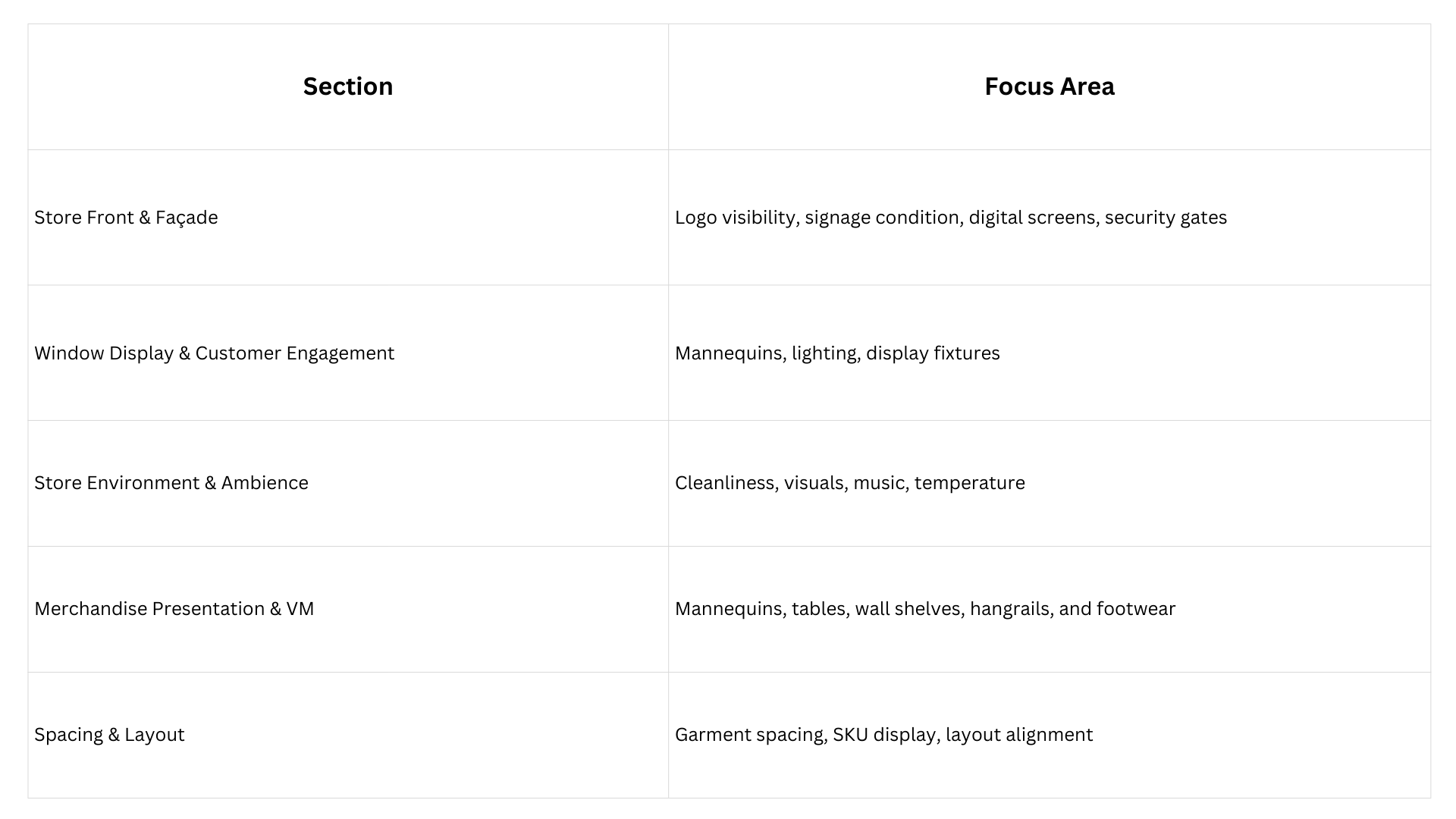
Downloads Available for the VM Checklist
To support different teams and workflows, the Store Visual & VM Audit Checklist can be downloaded in multiple formats.
Supported formats include:
PDF – for reference, training, and sharing Link
Word – for customization or documentation Link
Excel – for tracking, scoring, and analysis Link
The choice of format depends on how your team plans to use the checklist.
Understanding Checklist Attributes
Some checklist questions include specific attributes to improve accuracy and accountability.
Mandatory Image Capture
Certain VM checks require an image to be uploaded.
This is important because:
Images act as proof of execution
Managers can remotely verify store conditions
Visual issues are easier to understand than written comments
For example, mannequin styling, spacing between garments, or window displays are best validated with images.
Scoring System
Each checklist item can be scored.
Scoring helps managers:
Identify low performing areas quickly
Compare stores objectively
Track improvement over time
Low scores highlight exactly where attention is needed—whether it’s window displays, hangrails, or store ambience.
Where and How This Checklist Is Used
The VM checklist is commonly used in:
Single brand retail stores
Multi location retail chains
Franchise stores
Department stores
Who Executes the Checklist
Typically, the checklist is filled by:
Store managers
Visual merchandising executives
Area or cluster managers
Internal audit or operations teams
This ensures accountability at the store level while giving leadership clear visibility.
What Happens If the Checklist Is Missed or Poorly Executed
When VM audits are skipped or done casually, the impact is serious.
Possible outcomes include:
Stores drifting away from brand guidelines
Inconsistent customer experience across locations
Missed campaigns and promotions
Decline in walk ins and conversions
Increased rework during surprise audits
Poor VM execution doesn’t just affect one store—it damages the brand at scale.
Running the VM Checklist Digitally
Executing the checklist digitally solves many problems that paper checklists create.
Key Digital Benefits
Scheduling: Audits run on time without reminders
Offline execution: Checklist works even without a network
Image capture: Visual proof attached instantly
Geo tagging: Confirms the audit is done at the correct store
Audit logs: Complete history of inspections
Permissions: Right access to the right roles
Analytics: Store wise and section wise performance
Missed inspection alerts: No audit goes unnoticed
Digital execution improves control, transparency, and speed.
Closing Thoughts
Turning Checklists into a Growth Tool
A VM checklist should not feel like policing.
It should feel like support.
When teams understand that checklists help them perform better, stores improve faster. Managers can link checklist performance with recognition, training, and growth opportunities.
Checklists also help in onboarding new staff, setting clear expectations, and building a culture of accountability.
In the long run, strong visual merchandising discipline leads to better customer experience, stronger brand recall, and scalable retail operations.
A well designed Store Visual & VM Audit Checklist is not just a document—it’s a system that protects your brand every day.


